① How to stop receiving VRoid's newsletter
You can unsubscribe from VRoid's newsletter by clicking "配信停止はこちらから (Unsubscribe)" at the bottom of the email you received.
② If you unsubscribed, but keep receiving VRoid's newsletter
In case you keep receiving emails from VRoid even after following the steps described in ①, please try the following procedure.
1. Click "配信停止はこちらから (Unsubscribe)" at the bottom of the newsletter.
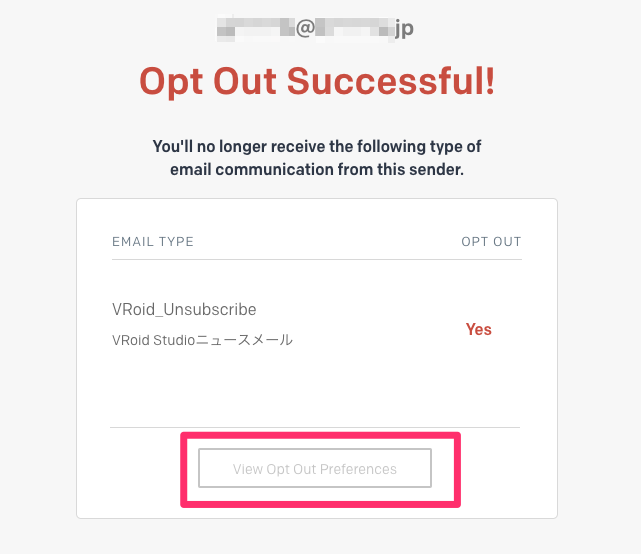
2. Click "View Opt Out Preferences".
3. Click "Save Preferences".
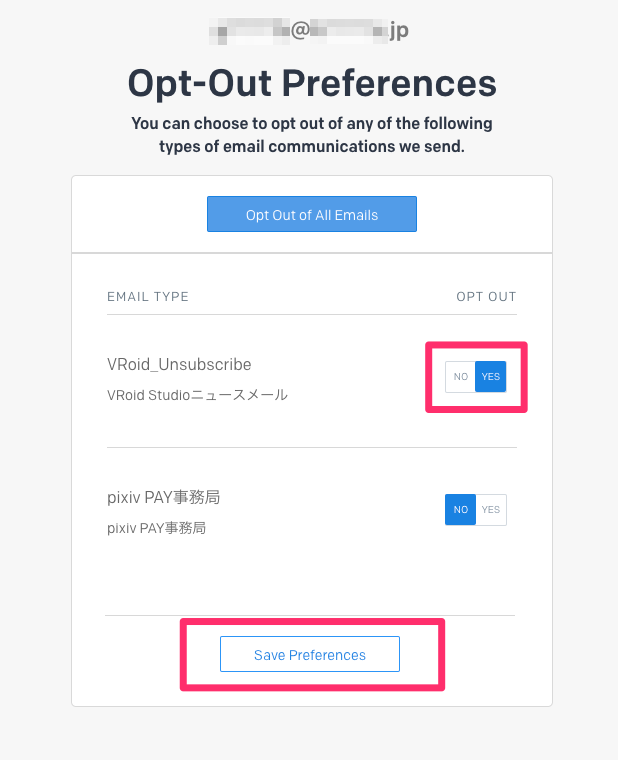
* You should be able to stop receiving VRoid's newsletter by the above method. If it still doesn't work, please click "Opt Out All Emails".

If you are still unable to unsubscribe, please contact us using the bug report form below.
In "About the bug", please enter the email address that you wish to remove from our mailing list.
(You can type "none" in all other fields)